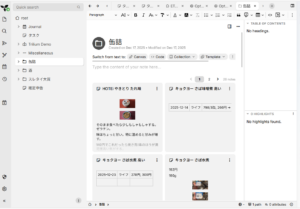
# Running `docker-compose up` will create/use the "trilium-data" directory in the user home# Run `TRILIUM_DATA_DIR=/path/of/your/choice docker-compose up` to set a different directory# To run in the background, use `docker-compose up -d`services:trilium:# Optionally, replace `latest` with a version tag like `v0.90.3`# Using `latest` may cause unintended updates to the containerimage:triliumnext/trilium:latest# Restart the container unless it was stopped by the userrestart:unless-stoppedenvironment:-TRILIUM_DATA_DIR=/home/node/trilium-data-TZ=Asia/Tokyoports:# By default, Trilium will be available at http://localhost:8080# It will also be accessible at http://<host-ip>:8080# You might want to limit this with something like Docker Networks, reverse proxies, or firewall rules,# however be aware that using UFW is known to not work with default Docker installations, see:# https://docs.docker.com/engine/network/packet-filtering-firewalls/#docker-and-ufw-'8080:8080'volumes:# Unless TRILIUM_DATA_DIR is set, the data will be stored in the "trilium-data" directory in the home directory.# This can also be changed with by replacing the line below with `- /path/of/your/choice:/home/node/trilium-data-${TRILIUM_DATA_DIR:-~/trilium-data}:/home/node/trilium-data# - /etc/timezone:/etc/timezone:ro-/etc/localtime:/etc/localtime:ro






コメント